


TL;DR:
- Ergonomic support promotes neutral posture, reducing strain and preventing musculoskeletal disorders.
- Adjustability and personalized setup are essential for long-term comfort, especially after age 40.
- Active movement and regular ergonomic checks enhance wellbeing beyond fixed products alone.
Musculoskeletal disorders, or MSDs, are not just a workplace statistic. They affect millions of American adults every single day, and the toll grows sharper after 40. MSDs account for 30-40% of workplace injuries and drain roughly 1% of US GDP annually. Yet many people in their 40s, 50s, and 60s still chalk up their back pain, stiff neck, or aching hips to “just getting older.” That assumption is costing you comfort you don’t have to lose. This guide breaks down what ergonomic support actually means, how it works in your body, where most people go wrong, and what you can do right now to feel meaningfully better.
Table of Contents
- What is ergonomic support, and why does it matter?
- The science behind ergonomic support: mechanics, methodology, and evidence
- Common ergonomic pitfalls: what most people get wrong after 40
- Innovative solutions: new directions and expert nuances in ergonomic support
- Our take: why the ‘one-size-fits-all’ approach fails in ergonomic support
- Ready to upgrade your comfort? Explore ergonomic solutions
- Frequently asked questions
Key Takeaways
| Point | Details |
|---|---|
| Ergonomic support works | Using ergonomic support reduces pain and injury risk for adults over 40. |
| Adjustability is key | Chairs and products that adapt to your body are better for preventing discomfort. |
| Simple changes help | Even small adjustments in chair, desk, or posture can lead to noticeable comfort gains. |
| Personalization matters | No ergonomic product suits everyone; regular tweaks to your setup bring the best results. |
What is ergonomic support, and why does it matter?
Ergonomic support sounds technical, but the idea is straightforward. It means designing the products and spaces around you so your body can stay in natural, comfortable positions without fighting gravity or strain. Think of it as giving your spine, joints, and muscles the right conditions to do their job without unnecessary effort.
In everyday life, ergonomic support shows up in things like:
- The gentle lumbar curve built into a quality chair back
- A contoured seat cushion that distributes your weight evenly
- An adjustable armrest that keeps your shoulders relaxed
- A desk set at the right height so your wrists stay neutral while you type
These are not luxury features. They are functional tools that reduce physical load on your body over hours of sitting or working.
“Ergonomic support features promote neutral posture, reduce strain, and support the spine’s natural curve to prevent musculoskeletal disorders.”
Why does this matter more after 40? Because your body’s ability to compensate for poor positioning quietly decreases with age. Muscles tire faster, joints carry more wear, and recovery takes longer. MSDs cause 69 million annual clinic visits and are the leading disability concern for adults in their 50s and 60s. These are not rare events. They are the predictable result of years of unsupported sitting, awkward reaching, and ignored posture signals.
Without proper support, your spine absorbs more compression, your muscles work overtime to stabilize you, and your focus narrows as discomfort grows. It becomes a domino effect of physical strain. Understanding posture correction after 40 is one of the most practical investments you can make in your long-term well-being.
The science behind ergonomic support: mechanics, methodology, and evidence
With the basics covered, it helps to understand the mechanics and real-world data behind these designs.
Ergonomics draws on two core sciences. Biomechanics studies how forces act on the body during movement and rest. Anthropometry measures human body dimensions to ensure products fit a wide range of people. Together, they inform every curve, angle, and adjustment range in a well-designed chair or cushion.
When your body is in a neutral posture, joints sit in their natural alignment, muscles use minimal effort to maintain position, and pressure is spread evenly across tissues. Shift out of that alignment for hours, and the load multiplies fast.
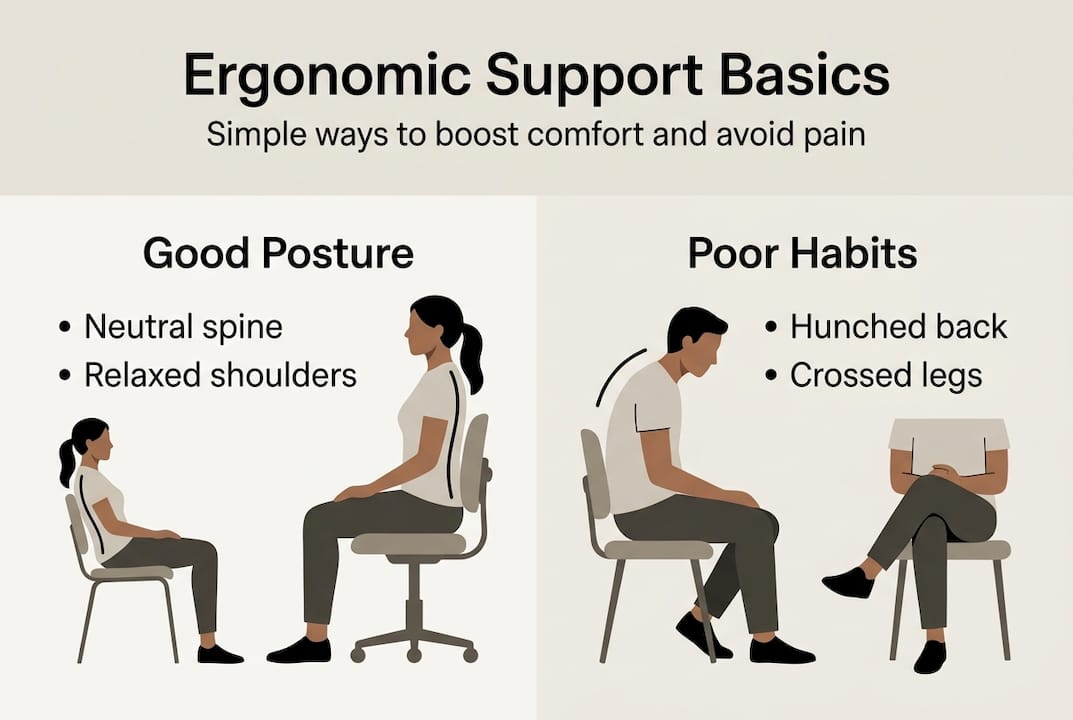
Here is a quick look at how support type affects outcomes:
| Feature | Fixed support | Adjustable support |
|---|---|---|
| Fits diverse body sizes | Rarely | Yes, fits up to 95% of users |
| Pain reduction over time | Minimal | Up to 0.43 points monthly |
| Adapts to task changes | No | Yes |
| Long-term comfort | Inconsistent | Consistently better |
Adjustable chairs lower pain up to 0.43 points monthly in clinical trials, a meaningful difference when you are sitting six to eight hours a day.
The three most important adjustment zones to prioritize:
- Lumbar support — Position it to fill the natural inward curve of your lower back, not push against it.
- Seat height — Your feet should rest flat on the floor with thighs roughly parallel to the ground.
- Arm supports — Set them so your shoulders drop naturally, not shrug upward.
Pro Tip: If you have to choose just one upgrade, start with lumbar support. It anchors the rest of your posture from the base up. Good ergonomic design for pain relief always begins with the lower back.
For a deeper look at the research behind these principles, ergonomics research continues to confirm that adjustability and neutral alignment are the two most reliable predictors of comfort outcomes.
Common ergonomic pitfalls: what most people get wrong after 40
Armed with the science, let’s explore real-life missteps, especially relevant for midlife adults working at home.

Remote work has created a quiet ergonomic crisis. Many people moved from office chairs (imperfect as they were) to kitchen stools, soft couches, or basic dining chairs. The result is hours of unsupported sitting in positions the body was never meant to hold for long.
The most common mistakes include:
- Seat height too low or too high, forcing the hips and knees into awkward angles
- Ignoring lumbar support entirely, letting the lower back round and collapse
- Using a fixed, non-adjustable setup that fits no one’s body perfectly
- Placing screens too low, pulling the neck forward and down for hours
- Skipping foot support, which shifts load unevenly up through the hips and spine
60% of remote workers use basic chairs that lack ergonomic features, and fixed supports rarely accommodate the natural diversity in body size and shape. A chair that works for someone five foot four will feel very different for someone five foot ten, even at the same desk.
Personalization matters more than people realize. Testing your setup, sitting for 20 minutes, and noticing where tension builds is more useful than buying an expensive chair and assuming it will fix everything. Explore ergonomics at home to understand how small environmental changes compound over time.
Pro Tip: Before spending money on new equipment, spend five minutes adjusting what you already have. Raise your chair, tuck a rolled towel behind your lower back, and elevate your screen. These zero-cost changes often produce immediate relief. For more targeted advice, see how to alleviate desk aches without overhauling your entire workspace.
Innovative solutions: new directions and expert nuances in ergonomic support
Understanding common pitfalls prepares you for the cutting edge. Let’s see how today’s ergonomic support is evolving.
The biggest shift in modern ergonomics is the move from static to dynamic support. Old thinking said: find the perfect posture and hold it. New thinking says: your body needs to move, and your setup should encourage that movement rather than lock you in place.
Here are three expert-endorsed strategies that reflect this shift:
- Prioritize adjustability over aesthetics. A chair that looks sleek but offers no lumbar adjustment will underserve you within weeks. Dynamic support fits 95% of users far better than fixed alternatives.
- Invest in education alongside equipment. NIOSH and OSHA both recommend engineering controls and worker training together, not just product purchases. Knowing why your setup matters helps you maintain it.
- Build movement into your day. Standing, stretching, and repositioning every 30 to 45 minutes reduces cumulative strain more reliably than any single product.
“The goal of ergonomic support is not to find one perfect position. It is to reduce the time your body spends in harmful ones.” This perspective, shared widely among occupational health specialists, reframes ergonomics as an ongoing practice rather than a one-time fix.
There is also an important debate worth knowing about. The role of posture in chronic pain is more nuanced than most people think. Psychosocial factors like stress, sleep, and mood influence pain perception significantly. Ergonomic products work best as part of a broader approach that includes movement, rest, and mental well-being.
Braces alone, for example, do not resolve chronic back pain. They may provide short-term relief, but without education and movement, they can actually weaken the muscles they are meant to protect. Explore ergonomic product benefits and learn how dynamic cushioning supports the body through natural movement rather than rigid restriction.
Our take: why the ‘one-size-fits-all’ approach fails in ergonomic support
Most ergonomic guides give you a checklist and call it done. Adjust your chair. Raise your monitor. Take breaks. Good advice, but incomplete. What they miss is the deeply personal nature of physical comfort.
Your height, weight, pain history, daily habits, and even your stress levels all shape what ergonomic support actually means for you. A lumbar cushion that feels perfect for one person may feel wrong for another. That is not a product failure. It is a human reality.
At Lunix, we believe ergonomics is a practice, not a purchase. You adjust, observe, and adapt. Your needs at 45 are not the same as they will be at 58. Your home office setup in summer may need a different configuration in winter when you layer up and sit differently.
Pro Tip: Set a 10-minute monthly reminder to check your setup. Sit down, notice where tension lives, and make one small adjustment. Over a year, those 12 small tweaks add up to a meaningfully more comfortable life.
The most lasting results come from combining smart equipment choices with daily body awareness and consistent movement. No product replaces that partnership. For practical strategies you can apply today, explore desk job discomfort solutions that work with your body, not against it.
Ready to upgrade your comfort? Explore ergonomic solutions
Now that you understand and can recognize true ergonomic support, you are ready to take steps that make comfort a daily reality.
At Lunix, we design recovery and comfort solutions built around how real bodies move, rest, and recover. Every product reflects the same principles covered in this guide: adjustability, neutral positioning, and support that works with your body’s natural needs.

Browse our full range of ergonomic recovery products to find solutions matched to your lifestyle and comfort goals. You can also visit our ergonomic solution benefits page to see exactly how thoughtful design translates into real, everyday relief. Your comfort is not a luxury. It is something you can build, one smart choice at a time.
Frequently asked questions
What does ergonomic support mean?
Ergonomic support means designing products or arrangements to keep your body in healthy, neutral positions, reducing strain and preventing injuries over time.
Are adjustable chairs better than fixed ones?
Yes. Adjustable chairs lower pain up to 0.43 points per month and accommodate far more body types than fixed designs, making them a much smarter long-term investment.
Do posture braces help with long-term pain?
Braces alone offer no additional benefit over education and exercise for chronic low back pain. A proper ergonomic setup combined with movement and awareness works far better.
Why are musculoskeletal disorders so common after 40?
Aging brings gradual changes in joint cushioning and muscle resilience, and older adults face higher MSD risk when their home or work setups do not accommodate those changes.
What small actions can improve ergonomic support at home?
Lumbar rolls and foot positioning offer significant comfort gains quickly. Start by adjusting chair height, adding a small lumbar pillow, and raising your monitor to eye level.
Recommended
- Master ergonomics at home: 61% less pain, more productivity – Lunix
- Dealing with Desk Job Discomfort: 5 Strategies to Stay Pain-Free While – Lunix
- Ergonomic design cuts back pain 54%: comfort guide 2026 – Lunix
- Benefits of Ergonomic Products: 60% Pain Relief & 12% Productivity – Lunix
- Ergonomic grip explained for climbers: boost performance - Gripnatic
- 7 Benefits of Ergonomic Travel Pillows for Economy Flyers – BOLSTIE TRAVEL PILLOW