


Working from home seemed like a dream until the pain started. 61% of remote workers report worsening musculoskeletal pain, and US companies lose $54 billion annually to these disorders. Your kitchen table setup might feel convenient, but it’s quietly damaging your neck, back, and shoulders. For individuals aged 40 to 65, poor ergonomics at home doesn’t just cause discomfort, it steals productivity and quality of life. This guide reveals proven ergonomic principles that transform makeshift workspaces into comfort zones, helping you work pain-free and perform at your best.
Table of Contents
- Key takeaways
- Understanding the impact of ergonomics on musculoskeletal health at home
- Core ergonomic principles and best practices for home workstations
- Combining ergonomic furniture and behavior changes for maximum benefit
- Common pitfalls and practical tips for ergonomics at home for 40-65 year olds
- Explore ergonomic solutions and recovery aids from Lunix
- Frequently asked questions about ergonomics at home
Key Takeaways
| Point | Details |
|---|---|
| Neutral posture foundation | Neutral posture distributes body load through the skeleton, reducing muscle strain and helping prevent chronic pain. |
| Monitor eye level | Keep the monitor at eye level and elbows at ninety degrees to reduce neck and shoulder strain. |
| Movement cycle | Follow a cycle of twenty minutes sitting, eight minutes standing, and two minutes moving to prevent tissue stiffness and circulation problems. |
| Ergonomics plus habits | Ergonomic furniture paired with regular posture checks and movement yields greater pain relief and productivity. |
Understanding the impact of ergonomics on musculoskeletal health at home
Middle-aged remote workers face a hidden epidemic. Musculoskeletal disorders now affect more than half of home-based professionals, with neck pain, lower back discomfort, and shoulder tension leading the complaints. The financial toll reaches beyond medical bills. Poor ergonomics costs American businesses billions in lost productivity, sick days, and workers’ compensation claims.
Your body wasn’t designed for eight-hour stretches in a dining chair. When you hunch over a laptop on your couch or crane your neck to see a monitor placed too low, you’re asking muscles and joints to work overtime. These awkward postures compress nerves, strain ligaments, and fatigue muscles that should be resting in neutral positions. Over weeks and months, temporary discomfort becomes chronic pain.
“Ergonomics isn’t about fancy equipment. It’s about positioning your body so muscles can relax while you work. Neutral postures let bones carry the load instead of soft tissues.”
For individuals between 40 and 65, the stakes are higher. Age-related changes in bone density, muscle mass, and joint flexibility make this demographic particularly vulnerable to ergonomic injuries. What a 25-year-old might shake off in a day can sideline someone in their 50s for weeks. The good news? Ergonomic design benefits back pain comfort through simple adjustments that support natural body mechanics.
Common problem areas include:
- Neck strain from monitors positioned below eye level
- Lower back pain from chairs lacking lumbar support
- Shoulder tension from keyboards placed too high or too far away
- Wrist discomfort from typing on laptop keyboards without external peripherals
- Hip and leg stiffness from prolonged sitting without movement breaks
Prevention beats treatment every time. Ergonomic interventions work by maintaining neutral spine alignment, reducing repetitive strain, and encouraging position changes throughout the day. When your workstation fits your body dimensions, muscles can maintain their natural length and tension. This reduces metabolic demand on tissues and prevents the micro-trauma that accumulates into injury.
Core ergonomic principles and best practices for home workstations
Neutral posture forms the foundation of ergonomic health. Your elbows should rest at 90°, screens should sit at eye level, feet should plant flat on the floor, and your lower back should press against lumbar support. This alignment distributes your body weight through your skeleton rather than straining muscles and ligaments. Think of it as letting your bones do the heavy lifting.
Follow this step-by-step methodology to optimize your workspace:
- Adjust chair height so feet rest flat with thighs parallel to the floor
- Position lumbar support to fill the curve of your lower back
- Set armrests so shoulders relax downward while elbows bend at 90°
- Place monitor top at or slightly below eye level, arm’s length away
- Position keyboard and mouse so wrists stay straight, not bent up or down
- Ensure adequate lighting to prevent eye strain and forward head posture
The 20-8-2 cycle transforms static work into dynamic movement. For every 30 minutes, aim for 20 minutes sitting, 8 minutes standing, and 2 minutes moving. This rhythm prevents the tissue stiffness and circulation problems that come from holding any single position too long. Your body craves variety, not perfection.
Pro Tip: Measure your body dimensions before buying ergonomic furniture. Desk height should allow forearms to rest parallel to the floor when elbows bend at 90°. Chair depth should leave 2 to 4 inches between the seat edge and the back of your knees. Standard furniture fits average bodies poorly, so adjustability matters more than brand names.
| Ergonomic Element | Correct Position | Common Mistake |
|---|---|---|
| Monitor height | Top of screen at eye level | Screen too low, causing neck flexion |
| Keyboard placement | Elbows at 90°, wrists straight | Keyboard too high, elevating shoulders |
| Chair lumbar support | Fills lower back curve | No support or positioned too high |
| Feet position | Flat on floor or footrest | Dangling feet or legs crossed |
| Mouse location | Within easy reach, same level as keyboard | Too far away, causing shoulder extension |
Lumbar support deserves special attention for the 40 to 65 age group. The natural curve in your lower spine needs consistent backing to prevent disc compression and muscle fatigue. Without it, you’ll unconsciously slouch forward, shifting weight onto your tailbone and straining the muscles along your spine. A small pillow or rolled towel can provide this support if your chair lacks built-in lumbar adjustment.
Screen height directly affects neck health. When monitors sit too low, you flex your neck forward for hours, stretching posterior neck muscles and compressing anterior structures. This forward head posture adds pounds of effective weight to your skull, forcing neck muscles to work overtime. Raising your screen eliminates this strain instantly. For more insights, explore desk job discomfort strategies that complement proper positioning.

Combining ergonomic furniture and behavior changes for maximum benefit
Height-adjustable desks paired with movement programs deliver results that furniture alone cannot match. Research shows ergonomic interventions reduce sitting by 12 to 206 minutes per workday while increasing daily steps by over 1,000. This combination attacks sedentary behavior from two angles: it makes standing easier and it builds habits that outlast initial motivation.
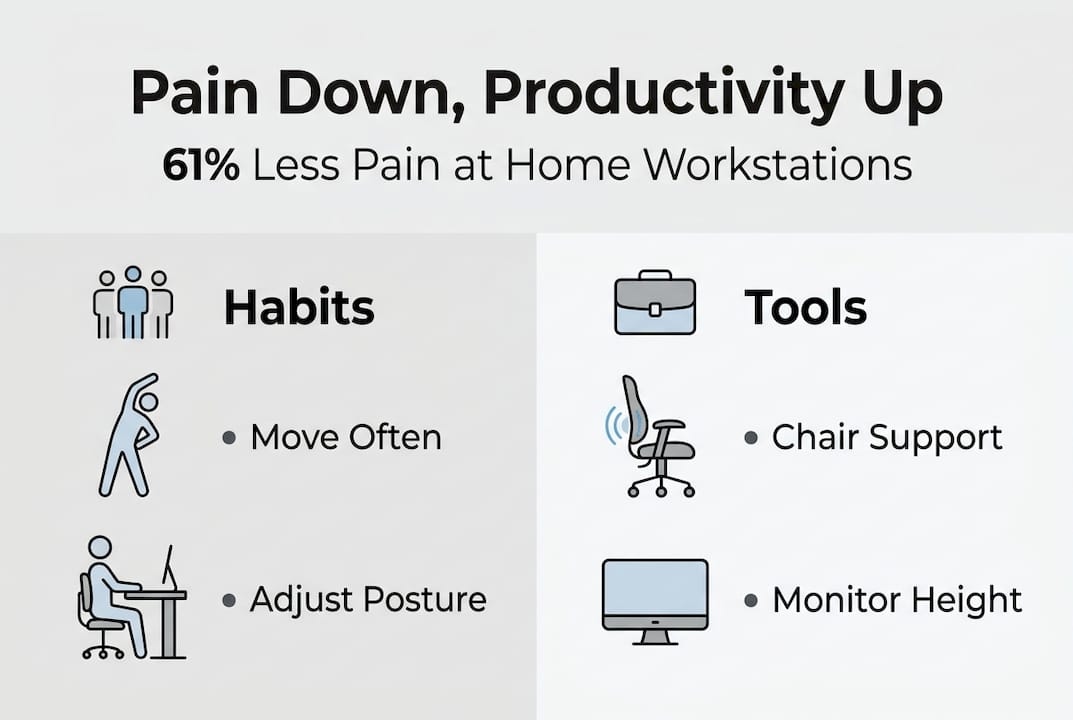
The magic happens when physical tools meet behavioral strategies. A standing desk gives you the option to change positions, but a movement reminder ensures you actually use it. Studies tracking office workers who received both adjustable furniture and coaching found dramatic improvements in pain scores, particularly for neck, shoulder, and lower back discomfort. The furniture enabled change; the behavior program sustained it.
| Intervention Type | Sitting Time Reduction | Daily Steps Increase | Pain Improvement |
|---|---|---|---|
| Height-adjustable desk only | 12-89 minutes | 500-800 steps | Moderate |
| Behavior program only | 45-120 minutes | 800-1200 steps | Moderate |
| Combined approach | 89-206 minutes | 1000-1500 steps | Significant |
| Control (no intervention) | No change | No change | No change |
Behavioral strategies that support ergonomic furniture include:
- Setting hourly movement alarms to prompt position changes
- Scheduling walking meetings or phone calls taken while standing
- Placing frequently used items out of immediate reach to encourage movement
- Alternating between sitting and standing in 30 to 60 minute blocks
- Tracking daily sitting time to build awareness and accountability
For individuals aged 40 to 65, this combined approach addresses age-specific challenges. Metabolism slows with age, making prolonged sitting more damaging to cardiovascular health. Joint flexibility decreases, so regular position changes prevent stiffness. Bone density concerns make impact activities risky, but standing and walking provide safe weight-bearing exercise. The ergonomic products benefits pain relief productivity connection grows stronger when you actively use the tools you invest in.
Pain outcomes improve most dramatically in the neck and upper back regions. Workers who combined adjustable desks with movement coaching reported 30% to 50% reductions in discomfort scores after just 12 weeks. Lower back pain showed similar improvements, though results varied based on pre-existing conditions and adherence to the program. The key insight? Furniture creates opportunity, but behavior determines results.
Sustaining these changes requires more than willpower. Environmental cues work better than motivation. Position your standing desk controller where you’ll see it. Keep comfortable shoes under your desk to remove friction from standing. Place a yoga mat nearby for stretching breaks. These small adjustments make healthy behaviors the path of least resistance, turning ergonomic intentions into automatic habits.
Common pitfalls and practical tips for ergonomics at home for 40-65 year olds
Makeshift home setups create more problems than they solve. Kitchen tables and sofas worsen pain because they weren’t designed for extended computer work. Dining chairs lack lumbar support and adjustability. Coffee tables force you to hunch forward. Couches encourage slouching that compresses your spine. What feels comfortable for 30 minutes becomes torture after three hours.
Laptops without external peripherals guarantee poor posture. The screen sits too low, forcing neck flexion. The keyboard positions your hands too close together, internally rotating your shoulders. Using a laptop as your primary workstation means choosing between seeing your screen and maintaining neutral wrist position. You can’t have both. The solution costs under $50: add an external keyboard, mouse, and laptop stand.
Remote work amplifies sedentary behavior. Without hallway walks to meetings or trips to the printer, you might sit for hours without realizing it. Home environments lack the natural movement cues that offices provide. You grab lunch from your kitchen instead of walking to a café. You attend video meetings from your desk instead of walking to a conference room. This reduction in incidental activity compounds the damage from poor ergonomics.
Common ergonomic mistakes at home include:
- Working from bed or couches that provide no postural support
- Using laptops without external monitors, keyboards, or mice
- Sitting in chairs designed for dining, not extended computer work
- Positioning monitors off to one side, causing neck rotation
- Ignoring lighting, leading to eye strain and forward head posture
- Skipping movement breaks because no one’s watching
For the 40 to 65 demographic, stability matters more than mobility in furniture choices. Chairs with five-point bases prevent tipping. Desks with sturdy construction won’t wobble during position changes. Avoid wheeled chairs on hard floors without proper casters, they can slide unexpectedly and cause falls. Your balance and reaction time aren’t what they were at 25, so choose equipment that compensates for these natural changes. Learn more about prevention through back pain prevention tips designed for sustainable wellness.
Pro Tip: Build an ergonomic home office for under $300. Invest in an adjustable monitor arm ($40 to $80), an external keyboard and mouse ($30 to $60), a lumbar support cushion ($25 to $50), and a footrest ($15 to $30). These items transform any desk into an ergonomic workstation. Skip expensive chairs initially; add proper support to your existing chair and upgrade later if needed.
Affordability shouldn’t block ergonomic improvements. Household items can bridge gaps while you save for proper equipment. Stack books under your monitor to raise it to eye level. Roll a towel for lumbar support. Use a cardboard box as a temporary standing desk converter. These makeshift solutions beat doing nothing, though purpose-built equipment performs better long term. Start with what you have, then upgrade strategically based on your specific pain points.
Explore ergonomic solutions and recovery aids from Lunix
Transforming your workspace is just the beginning. Your body needs recovery support after years of poor ergonomics and the daily demands of home-based work. Lunix offers recovery products specifically designed to relieve musculoskeletal discomfort and accelerate tissue healing. From targeted massage tools to therapeutic heat solutions, these products complement your ergonomic setup by addressing existing pain while you prevent future problems.

Affordable ergonomic accessories enhance comfort without breaking your budget. Lumbar supports, footrests, and positioning aids help you maintain neutral postures throughout your workday. When you combine proper workspace setup with recovery-focused products, you create a complete system for musculoskeletal health. Your home office becomes more than a place to work; it becomes a station for restoration and long-term wellness.
Frequently asked questions about ergonomics at home
How often should I adjust my home workstation?
Reassess your setup every three to six months or whenever you experience new discomfort. Your body changes, furniture shifts, and work patterns evolve. What worked in January might need tweaking by July. Spend 10 minutes checking monitor height, chair adjustments, and keyboard position quarterly to catch problems before they become painful.
What are simple movement breaks I can do at home?
Stand and stretch every 30 minutes, focusing on areas that feel tight. Walk to another room and back. Do 10 shoulder rolls and neck rotations. March in place for 60 seconds. Perform seated spinal twists. These micro-breaks take under two minutes but dramatically reduce stiffness and improve circulation throughout your workday.
Are ergonomic chairs enough to prevent pain?
Chairs help but aren’t sufficient alone. You need proper monitor height, keyboard position, movement breaks, and behavioral habits. Even the best chair can’t overcome eight hours of static sitting or a screen positioned too low. Think of ergonomic furniture as one component in a complete system, not a magic solution that works in isolation.
How to maintain stability while working at home to avoid falls?
Choose chairs with five-point bases and avoid wheeled seating on slippery floors. Keep walkways clear of cables and clutter. Use anti-slip mats under chairs if needed. When transitioning between sitting and standing, move slowly and use your desk for support. Proper lighting prevents trips over unseen obstacles. These precautions matter more as balance naturally declines with age.
Can ergonomic products fit a limited budget?
Absolutely. Start with affordable essentials like an external keyboard, mouse, and monitor stand for under $100 total. Add a lumbar cushion and footrest next. DIY solutions like book stacks for monitor height or rolled towels for lumbar support cost nothing. Prioritize items that address your specific pain points rather than buying everything at once. For additional recovery strategies, explore neck and shoulder pain recovery tips that complement your ergonomic investments.